
Why deterministic formulas matter in no‑code
Most no‑code apps fail quietly: a discount gets applied twice, a tax rate rounds differently on a receipt than in analytics, or a refund is computed from stale values after an edit. These bugs are rarely “logic errors” in the classic coding sense—they’re inconsistencies introduced by multi‑step workflows, implicit type casting, and rounding that happens in different places at different times.
A deterministic formula pattern is a repeatable way to ensure the same inputs always produce the same outputs, regardless of when and where the calculation runs. The goal is not only correct totals, but also predictable rounding and an audit trail that lets you explain exactly how a value was computed.
The deterministic formula pattern
Use the same three-layer approach for every calculation that touches money, quotas, balances, or compliance-relevant values:
- Normalize: coerce types, set defaults, and standardize units (including currency minor units).
- Compute: pure, side-effect-free formulas built from normalized values only.
- Persist and log: store both the computed result and the inputs/versions used to derive it.
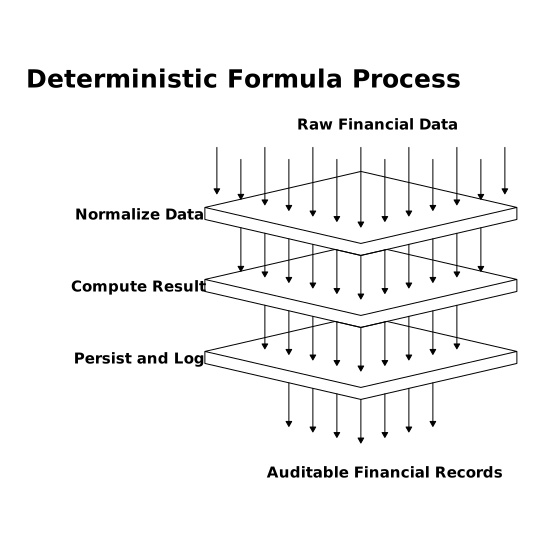
This pattern works across app builders and backends. In a visual development platform such as weweb.io, it maps cleanly to variables, workflows, and reusable functions/components—especially when calculations are reused across screens, automations, and API calls.
Layer 1: Normalize inputs so formulas don’t guess
Type and null safety
No‑code formulas often receive values as strings, empty values, or mixed types depending on the source (form field, query result, API payload). Normalize everything before computation:
- Convert numeric strings to numbers.
- Explicitly default null/empty values to 0 or an empty list.
- Clamp values to valid ranges (e.g., discount between 0 and 1).
Practical rule: never reference raw user input inside a financial formula. Reference only the normalized variable.
Use minor units for currency
The most reliable cross-step approach is to store and compute currency in minor units (cents) as integers:
- $12.34 becomes 1234.
- Percent-based discounts or taxes should also be converted deterministically (e.g., basis points).
This reduces floating-point drift, eliminates “0.30000000004” effects, and makes rounding explicit rather than accidental.
Layer 2: Compute with pure formulas and explicit rounding
Make rounding a first-class decision
In multi‑step apps, rounding is the source of most disputes. Decide and document:
- Where rounding occurs (line item vs. subtotal vs. final total).
- How rounding occurs (half-up, bankers rounding, always up for fees, etc.).
- What precision is used (2 decimals, 0 decimals, basis points).
A deterministic pattern is to do all intermediate calculations in minor units (or higher precision), then round once at the designated boundary. If you must round per line item (common in invoices), do it the same way everywhere: UI preview, stored record, and exported receipt.
Use named intermediate values
Don’t build one giant nested formula. Create intermediate variables that can be reused and logged:
- unit_price_cents
- quantity
- line_subtotal_cents
- discount_cents
- tax_cents
- line_total_cents
This makes reviews faster, reduces accidental double-application, and allows audits without reverse-engineering a formula chain.
Keep computations side-effect-free
“Pure” means the formula depends only on its inputs and doesn’t mutate state. In no‑code, this translates to:
- Compute values in local variables first.
- Write to the database only once the final value is computed.
- Avoid formulas that depend on “current time” or “current record state” unless that dependency is explicit and logged.
Layer 3: Persist results and build an audit trail
Store both the result and the context
A safe multi‑step app stores:
- Computed fields: totals in cents, tax in cents, discount in cents.
- Input snapshot: the normalized inputs used at calculation time (prices, quantities, rates).
- Formula version: a string like invoice_total_v3 so you can reproduce historic calculations after logic changes.
- Event metadata: who triggered it, when, and which workflow ran.
This is the difference between “the app says so” and “here is how the number was derived.” When workflows span multiple steps—draft, approve, charge, refund—an audit record prevents silent recomputation from overwriting the original basis.
Immutable ledger events beat mutable totals
For balances (wallets, credits, prepaid packages), prefer a ledger approach:
- Append events: credit_added, debit_applied, refund_issued.
- Compute the balance from events (or store a cached balance with reconciliation).
This keeps your calculations deterministic across time: you can always replay events to confirm the balance. If you work with marketing or finance workflows, this is especially relevant when handling non-cash adjustments; for a practical perspective on keeping reporting accurate, see how to treat ad credits and prepaid balances without distorting ROI.
Multi-step workflow pitfalls and how to neutralize them
Edits after approval
Common failure mode: a user edits a line item after an invoice is “approved,” and the app recomputes totals in the background. Deterministic fix:
- Lock the snapshot inputs at approval time.
- Require a new version or a credit note for changes.
- Log the approval event with the formula version and input snapshot.
Race conditions and double-triggering
Multi-step automations can run twice (double-clicks, retries, webhook re-delivery). Reduce this by:
- Using idempotency keys per operation (e.g., charge_attempt_id).
- Checking whether a ledger event already exists before inserting another.
- Storing a calculation hash of normalized inputs to detect duplicates.
UI preview vs. stored truth
If the UI shows one total and the database stores another, support tickets follow. Use one source of truth: compute in one place (server-side or a single shared function), then reuse the same computed fields everywhere. In WeWeb-style visual workflows, that often means centralizing formulas as reusable logic rather than rebuilding them per page.
A checklist you can apply to every “number” in your app
- Normalization: Are all inputs typed, defaulted, and range-checked?
- Units: Are money values stored in cents (or equivalent minor units)?
- Rounding: Is there one explicit rounding point and method?
- Purity: Can you recompute the same output from the same inputs?
- Auditability: Do you store the formula version and input snapshot?
- Idempotency: Can a workflow safely run twice without doubling a charge or discount?
Determinism is less about “being strict” and more about making your app explainable under pressure—when finance reconciles, when a customer disputes a charge, or when you refactor logic months later. The payoff is stability across multi-step apps, without giving up the speed that no-code platforms are built for.


