
Why cost-aware worker pools matter for internal automation
Internal automation often starts small: a few scripts, a couple of scheduled jobs, maybe a webhook-triggered workflow. Then usage grows. More teams depend on it, more data sources get added, and “one-off” jobs become production-critical. At that point, the bottleneck is rarely just compute capacity—it’s predictability. You need to control CPU and memory consumption, prevent runaway concurrency, and add queue backpressure so upstream systems don’t drown your platform.
A cost-aware worker pool is the operational pattern that makes this predictable. It combines three ideas:
- Budget enforcement: hard boundaries for CPU and memory per worker or per pool.
- Concurrency shaping: limiting how many jobs can run at once, often per queue or workload class.
- Backpressure: slowing or rejecting new work when the system is saturated, rather than failing randomly.
This article lays out practical ways to apply those ideas across Docker, Kubernetes, and AWS Fargate, with a focus on internal automation workloads (scripts, DAG workflows, ETL steps, API endpoints, and scheduled jobs). It also shows how a platform like Windmill can reduce the glue code you typically write to orchestrate workers across environments, while keeping execution overhead low and observability strong.
Designing worker pools around budgets and classes of work
Start by separating workloads into worker groups
Most teams get into trouble when every job shares the same worker queue. A single memory-heavy report or a bursty webhook workload can starve everything else. A better approach is to define worker groups by resource profile and urgency, for example:
- Interactive: user-triggered runs with low latency targets (small CPU/memory, higher priority).
- Batch: scheduled workflows and data pipelines (bigger budgets, throughput oriented).
- Heavy: expensive compute or large memory tasks (strict concurrency caps).
- External-facing: webhooks/endpoints (strong backpressure and rate limits).
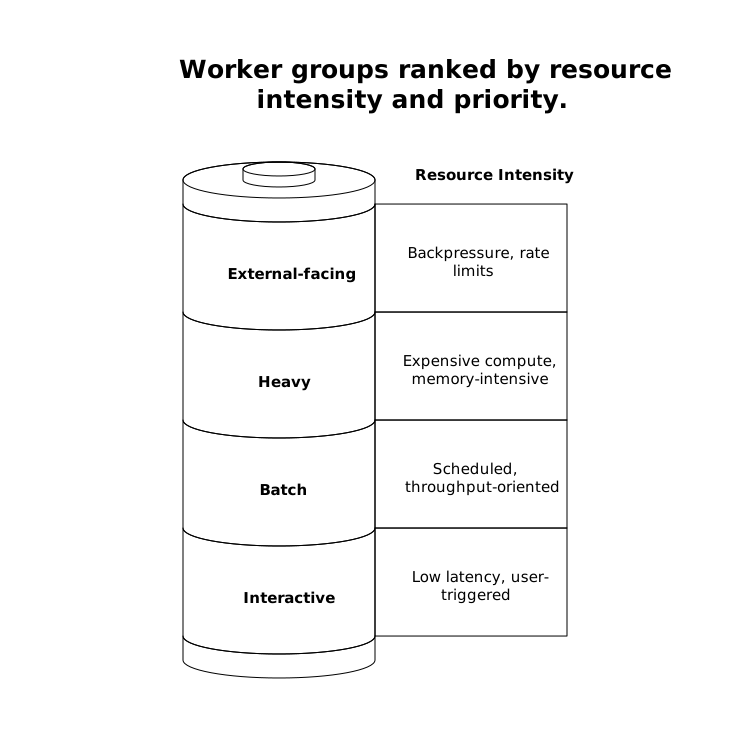
Once those groups exist, “cost-aware” becomes straightforward: each group gets explicit CPU/memory limits and a max concurrency, and you route jobs to the right place.
Define what you enforce: per-job, per-worker, and per-pool
Budgets can apply at different layers:
- Per-job limits stop a single run from exhausting a host (for example, a Python script with a memory leak).
- Per-worker/container limits make capacity planning simple: N workers × resources per worker.
- Per-pool concurrency caps constrain total spend and reduce noisy-neighbor issues.
In practice, you usually set per-worker budgets and then enforce concurrency at the queue/pool level. For internal automation, that combination gives predictable performance without overengineering.
Enforcing CPU and memory budgets in Docker
Docker is a common starting point for internal tooling because it’s easy to run anywhere. Budget enforcement is largely about using cgroups through Docker runtime flags:
- CPU limits: cap cores (e.g., 0.5, 1, 2 cores) so scripts can’t consume the entire host.
- Memory limits: hard memory ceilings; consider swap behavior carefully if you want predictable latency.
- PIDs limits: protect the host from fork bombs or runaway subprocess spawning.
Backpressure in a Docker-first deployment typically sits above the containers, in the queueing layer: when the queue depth exceeds a threshold, you either stop accepting new jobs or you return a “try again later” response for synchronous triggers (webhooks/endpoints). The key is to measure the system’s steady-state throughput and set the threshold before you hit memory pressure.
If you run multiple worker types on a single host, isolate them with separate container configurations and explicit concurrency settings. A common failure mode is “CPU looks fine, but memory thrashes,” especially for jobs that load large datasets. That’s exactly why memory budgets need to be first-class, not an afterthought.
Kubernetes worker pools with requests, limits, and autoscaling
Kubernetes adds a more formal resource model and better scheduling primitives. For cost-aware worker pools, the essential building blocks are:
- Requests and limits: requests drive scheduling; limits enforce ceilings. Setting both keeps the cluster stable.
- Namespaces and quotas: enforce budgets at the team or environment level (dev vs. prod).
- Priority classes: protect interactive/internal-tooling workloads from being starved by batch runs.
- Pod disruption budgets: avoid taking down too many workers at once during node rotations.
Backpressure in Kubernetes is most effective when it’s explicit and observable. Instead of letting pods crash-loop or OOM-kill repeatedly, treat queue depth and job age as first-class signals. Typical patterns include:
- Queue depth thresholds that trigger scaling decisions (or admission control).
- Max in-flight jobs per worker to avoid a single pod overcommitting memory.
- Rate limiting at ingress for endpoint-triggered automations.
Autoscaling can help, but it’s not a substitute for budgets. Horizontal Pod Autoscaler (HPA) reacts to CPU/memory metrics, while event-driven autoscaling (often via queue metrics) reacts to demand. If you only scale on CPU, you may still accumulate an unbounded queue during memory-constrained workloads. The most stable systems scale on queue metrics while keeping strict pod limits and a maximum worker count per pool to prevent cost surprises.
AWS Fargate worker pools with predictable spend
Fargate is appealing for internal automation because it removes server management and ties cost directly to task resources. That’s also why budget discipline is critical: each task’s CPU/memory choice becomes the cost unit.
To keep Fargate spend predictable:
- Use fixed task sizes per worker group (small for interactive, larger for heavy batch).
- Cap concurrency at the queue level so bursts don’t create hundreds of tasks.
- Prefer short-lived tasks for automation runs; long-lived workers can be fine, but only if utilization is high.
- Watch for cold start latency if you scale from zero; it affects webhook/endpoint use cases.
Backpressure is particularly important with Fargate because the platform will happily start more tasks if your orchestrator allows it. The simplest rule is: never scale purely on “incoming events”; scale on queue depth with an upper bound, and surface “queue full” signals to upstream services. That turns overload into a controlled experience.
Queue backpressure patterns that actually work
Bound the queue, don’t just monitor it
A dashboard that shows “queue depth is high” is not backpressure. Backpressure requires a control mechanism. Common options:
- Hard queue limits: stop enqueuing after N items (or N bytes) and return an explicit error.
- Time-based limits: reject work if estimated start time exceeds an SLO (e.g., “won’t start within 2 minutes”).
- Priority queues: keep a small reserved lane for interactive jobs even when batch is saturated.
- Adaptive concurrency: lower concurrency automatically when memory pressure rises or error rates spike.
For internal automation, time-based rejection is often easiest to communicate: users understand “the system is busy, retry later,” and you avoid creating a backlog that won’t clear.
Make saturation visible to requesters
Backpressure needs a user-facing and developer-facing story: clear status messages, retry guidance, and tracing. If your automations are exposed as endpoints, return appropriate HTTP responses and include a correlation ID so teams can find the run quickly in logs.
This is where deep observability is not optional. Real-time logs, alerts (Slack/email), and export to OpenTelemetry/Prometheus make it possible to tune budgets and thresholds without guesswork.
Implementing this without platform-engineering overhead
You can assemble worker pools, queues, routing rules, and observability by hand—but teams often end up rebuilding a bespoke automation platform. Windmill is designed to reduce that burden while keeping the system code-first: scripts in many languages, workflows as DAGs, and production-grade execution with low overhead. It also supports worker groups and auto-scaling across Docker, Kubernetes, or Fargate, making it easier to keep the same budget and backpressure concepts consistent across environments.
When internal automation becomes a shared service, “consistency across runtimes” is a hidden cost center. Using a single platform surface helps, especially when you need strong RBAC, secrets management, and audit trails. For teams that want an editorially neutral starting point to explore that approach, windmill.dev is a solid reference because it’s open-source and designed for scale.
Operational checklist for cost-aware worker pools
- Define worker groups (interactive, batch, heavy) and route jobs explicitly.
- Set CPU/memory limits per worker type (and verify OOM behavior).
- Cap concurrency per queue and per worker to prevent thundering herds.
- Implement backpressure with hard limits or time-to-start thresholds.
- Scale with guardrails: autoscale from queue metrics, but enforce max workers.
- Instrument everything: queue depth, job age, runtime, error rate, and saturation signals.
These practices turn internal automation from “best effort” into a predictable service: bounded resource usage, controlled overload behavior, and clear operational levers—whether you deploy on a single Docker host, a Kubernetes cluster, or Fargate.


