
Why new mailboxes get “soft-throttled”
When you create a brand-new Gmail or Microsoft 365 inbox and start sending outbound emails, you’re not evaluated like a mature sender. Providers apply a practical trust model: a new mailbox has little behavioral history, few relationship signals, and limited evidence that recipients want the mail. The result is often a “soft-throttle” phase where your sending isn’t necessarily blocked, but your throughput and placement are constrained until you demonstrate predictable, legitimate patterns.
Soft-throttling can show up as slower delivery, intermittent deferrals, reduced daily capacity, or sudden placement shifts into Promotions/Other or even Spam when volume spikes. In many cases, the mailbox is technically authenticated and “configured correctly,” yet still treated cautiously due to age and observed behavior.
What the mailbox age signal really reflects
Mailbox age isn’t just a timestamp. It’s a proxy for trust built through consistent behavior. Gmail and Microsoft 365 both look for evidence that a sender is stable and wanted, and that the mailbox behaves like a real user rather than an automated blast account. Some of the strongest indicators are behavioral and engagement-driven, not purely technical.
1) Behavioral history and predictability
Providers reward routine. A new mailbox that suddenly sends 300 near-identical emails on day two looks unlike a human user and more like a compromised or purpose-built bulk sender. Predictable growth (small, steady increases) is easier for filters to interpret as legitimate.
2) Relationship signals
New inboxes lack prior “conversation graphs.” Replies, back-and-forth threads, and organic recipient interactions help establish that your mailbox is part of normal communication patterns. One-way outreach with low interaction gives providers less positive evidence to work with.
3) Engagement quality, not just opens
Opens are a weak signal in modern deliverability because tracking is inconsistent and privacy features can distort measurements. Stronger signals often include replies, messages being moved out of Spam, messages being starred/saved, and low complaint rates. For Microsoft 365, tenant-level and mailbox-level behaviors also matter: consistent usage, healthy list hygiene, and stable sending patterns reduce suspicion.
4) Content and template consistency
Templated outbound is normal, but extreme repetition, aggressive link density, or “salesy” phrasing can amplify the risk when combined with a new mailbox and rising volume. Early on, even small content mistakes can tip classification toward bulk folders because the sender has not yet earned much benefit of the doubt.
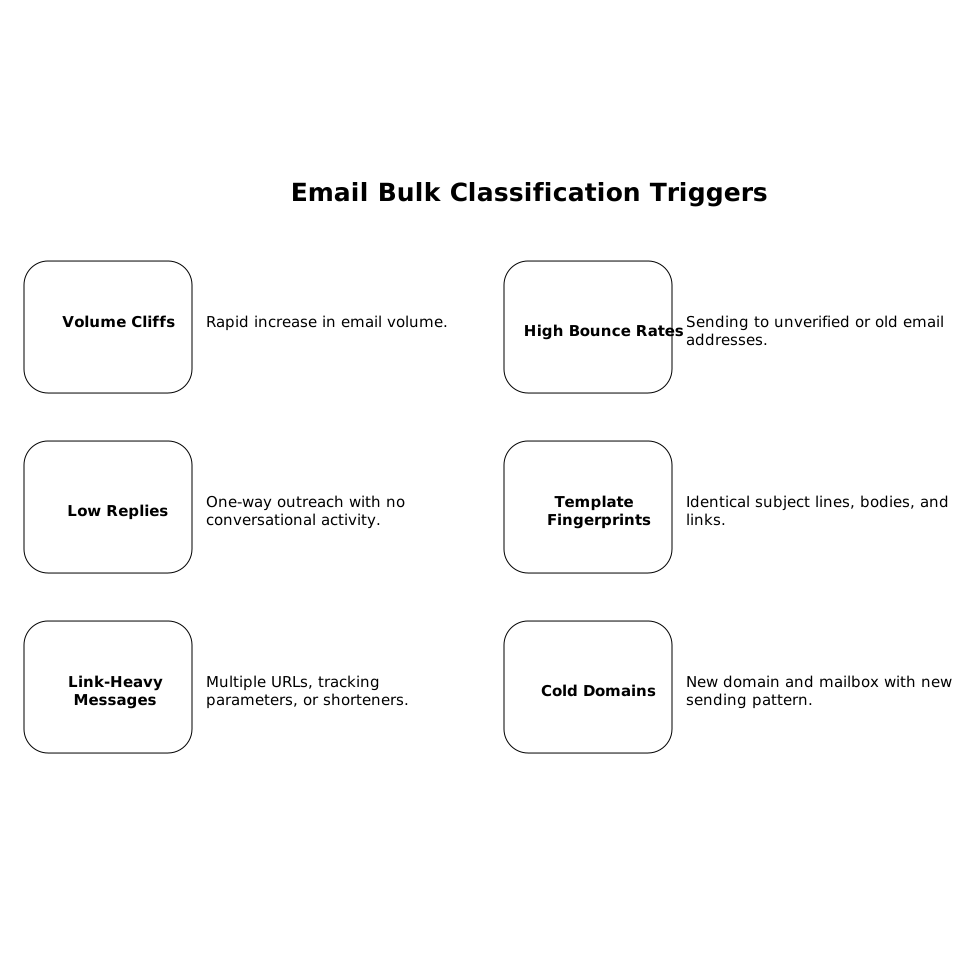
Common triggers that push a new inbox into bulk classification
- Volume cliffs: jumping from a handful of emails to dozens or hundreds within 24–48 hours.
- High bounce rates: sending to unverified addresses or old lists, creating immediate negative signals.
- Low or zero replies: pure one-way outreach with no conversational activity.
- Template fingerprints: identical subject lines, identical bodies, identical links across many recipients.
- Link-heavy messages: multiple URLs, tracking parameters, or shorteners right away.
- Cold domains and cold mailboxes at once: new domain + new mailbox + new sending pattern is a triple-risk combination.
A practical ramp plan for Gmail and Microsoft 365
The goal of a ramp is simple: scale sending while keeping your signals “human,” consistent, and engagement-positive. Below is a conservative approach that works for many teams; your safe ceiling depends on list quality, audience fit, and how many mailboxes you distribute sending across.
Step 1: Start with real conversations before outreach
In the first days, prioritize email activity that looks like normal user mail: short messages, replies, and a few threads with known contacts. This helps build early relationship and engagement signals. Avoid launching a full outbound sequence immediately after inbox creation.
Step 2: Increase volume gradually and avoid spikes
Instead of doubling volume overnight, increase in small increments and keep daily patterns steady. A good rule is “smooth curves, not cliffs.” If you need to scale faster, spread sending across multiple mailboxes rather than forcing one new inbox to carry the load.
Step 3: Keep early content simple
Early warmup messages should be lightweight: minimal links, minimal formatting, and plain language. As reputation improves, introduce the normal elements of your outbound (links, richer formatting) slowly. Consistency is your friend: don’t change every variable at once.
Step 4: Protect list quality aggressively
Bounces are a fast way to earn negative scoring. Verify addresses before sending, remove invalid contacts quickly, and watch for patterns by domain (for example, a cluster of bounces on one company’s domain). If you’re doing outreach, refine targeting so your emails actually match recipient intent.
Step 5: Monitor deliverability signals you can act on
Don’t rely on a single metric. Track:
- Deferrals and retry patterns (a sign of throttling)
- Spam placement and “not spam” recoveries
- Reply rate and thread continuation
- Bounces and complaint indicators
- Folder placement changes after volume increases
If performance drops after a volume increase, roll back to the last stable level for several days before attempting another step up.
How email warmup helps without “gaming” the system
Email warmup is most effective when it creates realistic engagement signals and steady usage, rather than artificial bursts. Done properly, it supports the same outcomes providers want to see from legitimate senders: stable sending patterns, positive interactions, and ongoing mailbox activity.
A specialized platform like mailwarm is designed to automate this process at scale by generating authentic-looking engagement (opens, replies, and inbox interactions) across major providers including Gmail and Microsoft 365. The benefit is operational consistency: you can keep activity steady every day, avoid volume cliffs, and build reputation while your real outbound program ramps safely.
Gmail vs Microsoft 365 nuances worth knowing
Gmail
Gmail is highly sensitive to sudden behavior changes and to low engagement relative to volume. New senders often see soft limits until their mailbox demonstrates stable patterns and recipients interact. Gradual sending, high relevance, and clean lists matter more than clever formatting tricks.
Microsoft 365
Microsoft 365 environments can involve additional layers of policy and filtering, and sending reputation can be influenced by tenant-level behavior. Consistent mailbox activity, low complaint rates, and careful ramping help prevent bulk classification. If your organization uses Microsoft security policies, coordinate with administrators so legitimate outbound isn’t mistaken for risky automation.
Two operational habits that reduce long-term risk
Keep a “change log” for deliverability
When deliverability changes, teams often forget what changed first: template edits, list source, sending times, new domains, or new automation. Maintaining a small log of changes makes troubleshooting faster and prevents repeating the same mistakes. This mirrors the discipline used in other reliability domains, similar to how teams structure evaluation artifacts in a failure-mode taxonomy workflow.
Use evidence when requesting policy or tooling changes
If you need to ask for more sending capacity, revised security rules, or new tooling, a short evidence pack (bounce rates, reply rates, throttling timestamps, and sample headers) keeps the discussion grounded and speeds decisions. A structured approach like a feedback evidence pack is surprisingly effective here.
What “good” looks like before you scale hard
- Stable daily sending with no sharp spikes
- Low bounces and consistent targeting quality
- Steady replies and thread activity (even modest)
- Minimal spam placements and successful recoveries when they happen
- Gradual introduction of links, templates, and automation
Mailbox age soft-throttling isn’t a punishment; it’s a caution period. Treat it like onboarding: prove consistency first, then scale.