
Why “booked” doesn’t always mean “revenue”
Hotels and restaurants live and die by utilization: rooms filled, tables turned, covers paid. Yet the path from a confirmed reservation to actual revenue is full of leakage—especially cancellations, late changes, and no-shows. The good news is you already own much of the signal needed to tighten that gap. Your reservation platform and POS together can explain who books, who arrives, what they buy, and when they tend to drop off. When those signals become remarketing audiences, you can run conversion-focused campaigns that are less about “more impressions” and more about “more arrivals and higher checks.”
What data matters and what to standardize first
Before you build audiences, align definitions across systems. Many teams struggle because “status” labels differ between platforms or staff use custom notes inconsistently. Aim for a small, shared taxonomy you can trust.
Reservation system fields to capture reliably
- Reservation status: booked, confirmed, modified, cancelled, no-show, seated/arrived (or checked-in for hotels).
- Lead time: days/hours between booking and reservation time.
- Party size / room type: key for expected value and staffing.
- Channel: direct, OTAs, concierge, phone, walk-in (restaurants often miss “phone” attribution).
- Contact tokens: email and phone (hashed where possible), plus a customer ID if your system supports it.
POS fields that change the remarketing game
- Transaction timestamp: tie spend to reservation windows.
- Net revenue and margin proxy: not every guest is equally valuable.
- Item/category mix: bar-heavy vs. entrée-heavy, breakfast vs. dinner, spa add-ons, etc.
- Comp/discount flags: useful to exclude chronic deal-only behavior from certain campaigns.
How to link reservation and POS events into usable audiences
The goal is not “perfect identity resolution.” The goal is consistent, privacy-aware matching that supports decision-ready segments. Depending on your stack, you may link by a shared customer ID, email/phone tokens, or an internal reservation ID passed into the POS as a reference. Even partial matches are valuable if the audience rules are stable.
Event model: think in three phases
- Intent: reservation created, confirmation clicked, deposit paid.
- Arrival: seated/checked-in, table opened, room occupied.
- Value: POS purchase, add-on upgrade, second round, late checkout, dessert, bottle service.
Once your events map to these phases, your audiences can target the phase that needs nudging—confirmation, arrival, or upsell.
Conversion-focused remarketing audiences you can build now
Below are practical segments hotels and restaurants can deploy with Google Ads, Meta, and email/SMS platforms. The key is to keep each audience tied to a specific operational outcome (reduce no-shows, increase pre-arrival intent, raise average check).
1) “Booked but not confirmed” within a short window
Target guests who booked but didn’t complete your preferred confirmation step (email click, SMS confirmation, deposit, pre-auth). Serve a message that removes friction: directions, parking/valet details, menu highlights, check-in time reminders, or a one-tap confirm link.
2) High lead-time bookers who historically cancel
Use reservation history to identify guests who book far in advance and then cancel late. Instead of blanket reminders, run a sequence: a helpful planning message at T-7 days, a friction-reducer at T-48 hours, and a clear policy reminder at T-24 hours. Exclude guests who already placed a deposit.
3) Prior no-shows (with nuanced exclusions)
This is sensitive: you don’t want to alienate a good customer who missed once due to a flight delay. Segment by frequency (e.g., 2+ no-shows in 12 months) and by value (a high-spend guest may warrant concierge-style confirmation rather than automated pressure). The conversion goal here is simple: turn “likely no-show” into “arrived.”
4) “Arrived but low spend” vs. “Arrived and high spend”
POS lets you split on actual behavior. For restaurants, low-spend arrivals might receive remarketing that emphasizes prix-fixe specials, dessert pairings, tasting menus, or bar experiences. High-spend arrivals might be better suited for VIP experiences, chef’s table, wine dinners, or private dining inquiry flows. For hotels, similar logic applies to room upgrades, late checkout, spa, or dining credits.
5) Category-based audiences that mirror real preferences
Build segments around item/category mix: cocktail-forward guests, brunch loyalists, steakhouse spenders, spa purchasers, or guests who repeatedly buy add-ons. These are more actionable than generic “past purchasers” because the creative can be specific without being creepy.
6) “Walk-ins who became regulars” and “regulars at risk”
POS makes it easier to find local regulars even when they rarely book online. Create a “regulars at risk” audience (e.g., no visit in 60–90 days) and run gentle reactivation with a seasonal hook. Keep the messaging informational—new menu, live music nights, refreshed rooms, renovated pool—rather than discount-first.
Messaging that reduces no-shows without training guests to wait for discounts
The highest-performing no-show prevention creative is often operational, not promotional. People skip reservations because something felt uncertain: parking, timing, dress code, the menu, or how to modify the booking. Use your remarketing to answer those questions fast.
- Remove friction: one-tap confirm, easy modify/cancel, clear policy language.
- Increase commitment: pre-order options, deposits for peak times, add-to-calendar links.
- Reassure logistics: maps, valet details, accessibility info, check-in process.
- Use value cues: what makes the experience worth showing up for (signature dishes, views, events).
Measurement that connects ads to arrivals and revenue
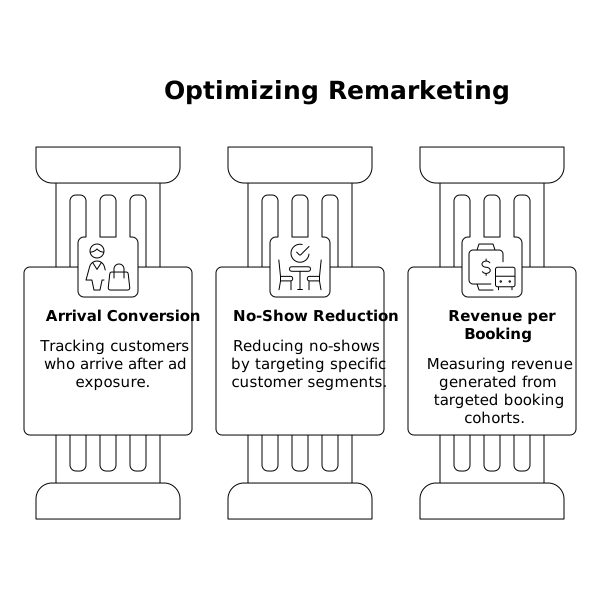
Most remarketing reports optimize to clicks, not show rates. To make this work, define conversion actions that reflect real outcomes:
- Arrival conversion: seated/checked-in within a defined window after ad exposure.
- No-show reduction: show rate uplift for targeted segments versus a holdout group.
- Revenue per booking: POS revenue tied back to reservation cohorts.
Keep your accounting clean so campaign ROI isn’t distorted by credits or prepaid balances; the same discipline used in treating ad credits and prepaid balances without distorting channel ROI applies here too.
Privacy, consent, and data handling you should treat as non-negotiable
Reservation and POS data is personally sensitive. Build audiences with consent-aware practices: only message opted-in contacts for email/SMS, hash identifiers for ad platforms when applicable, and document what data is used for what purpose. If your team uses AI tools to summarize performance or generate insights, be disciplined about source attribution and boundaries—especially when sharing internally or with ownership groups. The same rigor described in multimodal citation hygiene for AI answers and brand mentions is a good standard for keeping decisions traceable.
Implementation approach that works for busy hospitality teams
You don’t need a months-long data warehouse project to start. A practical path is:
- Week 1: standardize reservation statuses, export a clean set of historical outcomes, and define 4–6 audiences.
- Week 2: connect platforms (via native integrations, CDP, or secure uploads), launch two remarketing sequences, and add arrival-based reporting.
- Week 3–4: refine by lead time and value, introduce holdouts, and adjust creative to reduce friction rather than push discounts.
Teams that want this to stay lightweight typically benefit from a partner who understands both hospitality operations and performance marketing. That’s where a hospitality-focused agency like kiksmedia.com can be useful—helping translate reservation and POS realities into audiences, creative, and measurement that management can actually act on.
Vertical Video